3D Printing

3D Printing

Enable customers to customize 3D printable models, preview in real-time, and order with confidence.

3D print configurator with material and printability cards
STL Export Ready
100% Printable
Instant Quotes
Examples

A Printable Assembly You Can Open Right Now

Print clearance as a parameter instead of a rework step: the fit is decided in the browser, before the first print starts.

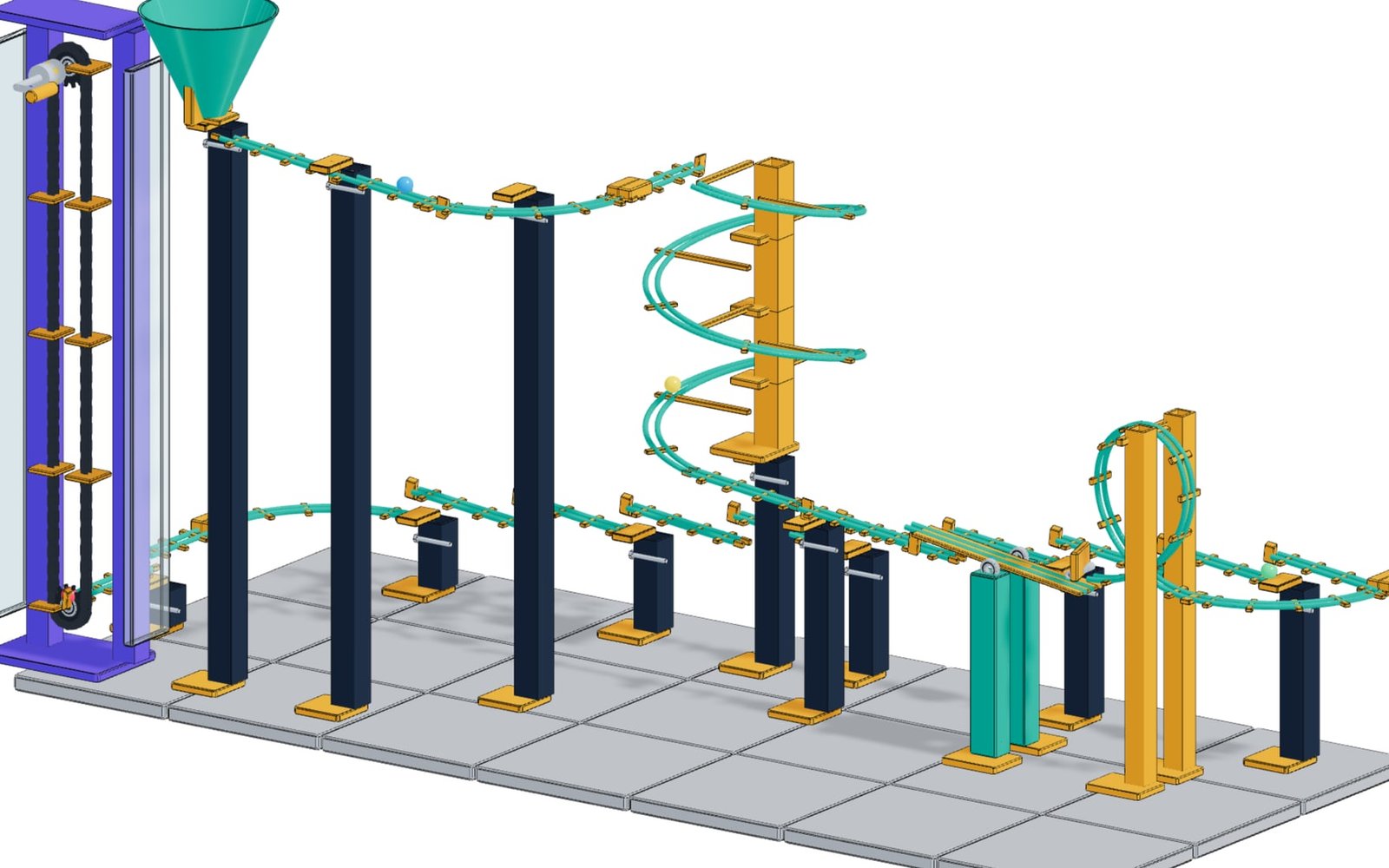
3D Printing example: Modular kinetic marble run

Modular kinetic marble run

Ball diameter, module grid, track width, helix turns and elevator height are parameters, and the print clearance acts on every clip connector at once. Chain elevator, switch, helix and loop run as real mechanics, and every module prints as a separate part.

Module grid 120-180 mmClearance 0.20-0.50 mmBall ⌀ 16-24 mmPrints module by module
Open example
Capabilities

3D print configurators that protect printability

3D printing workflows need customer freedom without broken meshes. confBuild connects customization controls with printability checks, material choices, pricing, and export-ready files.

Customize safely Let customers adjust dimensions, text, options, and materials inside printable limits.
Validate early Check wall thickness, overhangs, supports, and geometry before export.
Export directly Create STL, 3MF, quote, and order data from the configured model.

From custom model to printable file

Connect customization, pricing, export files, and print validation before the model reaches the slicer.

  1. 01
    Expose parameters

    Set safe ranges for dimensions, personalization, and product options.

  2. 02
    Preview the print

    Show the customer the exact configured model and material choice.

  3. 03
    Validate geometry

    Catch unprintable conditions before the file reaches the slicer.

  4. 04
    Send print data

    Export STL, 3MF, quote inputs, and order details.

Handoff

Send validated geometry to the print queue

Print-ready configurators keep customization, material choice, geometry checks, quote data, and export files together before slicing begins.

Clean print file Generate watertight STL or 3MF output from the selected parameters.
Material and price context Attach color, material, volume, print-time, and complexity inputs to the order.
Fewer failed prints Catch wall thickness, scale, and option constraints before the file reaches production.
Send validated geometry to the print queue
Capabilities

Built for Print-Ready Customization

Let customers personalize printable products while the model protects mesh quality, material context, pricing, and export files.

01

Safe Parameter Ranges

Expose dimensions, text, patterns, accessories, and product options while keeping wall thickness, scale, and printable bounds under control.

  • Dimension limits
  • Text and logo options
  • Feature toggles
02

Printability Checks

Catch common production risks before export by checking geometry state, thin areas, unsupported features, and selected process assumptions.

  • Wall thickness
  • Mesh state
  • Process constraints
03

Material and Quote Logic

Attach color, process, material, volume, print-time, and complexity inputs to the current configuration so pricing stays explainable.

  • Material choice
  • Volume estimates
  • Quote inputs
04

Print File Handoff

Generate STL or 3MF files and order notes from the same customer-approved model, ready for slicing or internal review.

  • STL, 3MF
  • Order package
  • Slicer-ready context
Outputs

Print outputs ready for the next step

Each custom order keeps the geometry and business data together.

Printable mesh Watertight STL or 3MF output generated from the selected parameters.
Material choice Color, material, and process information tied to the configuration.
Cost estimate Volume, material, print-time, and complexity inputs for instant quotes.
Order package Customer options, geometry files, and print notes in one handoff.
Best fit

Best fit

  • Print-on-demand businesses offering customizable products
  • Makers and manufacturers that need safe parametric model exports
  • Teams reducing failed prints through configuration rules

Launch your 3D print service

Start offering customizable 3D printed products today.